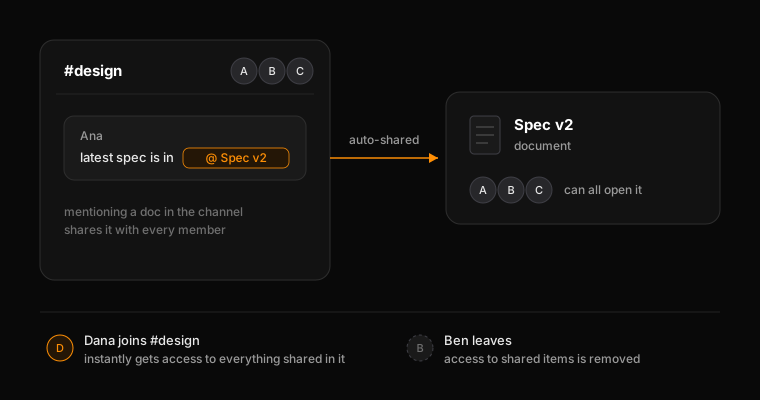
In Macro, who has access to what is controlled by what we call “channel-based” sharing. When you mention something it is shared with all members of the channel. If somebody is added to the channel, or removed from the channel, they will lose access to the document. This channel-based sharing prevents footguns that occur with Notion and Slack, or Notion and Docs, etc. where a people don’t have access to things and need to request access. In Macro, it works like magic. The exception to channel-based sharing is Teams, where there are special rules for the auto-sharing sharing of Tasks, Emails and Calls. Auto-sharing is designed to ensure everybody on the team has access to e.g. seeing what tasks other engineers are working on without the task having to explicitly be shared in the channel.

General Rules

User’s need to have a file shared with them in order to receive an inbox notification. @mentioning in the body of a markdown file (documents, tasks) will not result in an inbox notification. @mentioning in a thread container will result in an inbox notification (comments, messages)

Documents

Notifications only appear after a doc is explicitly shared with a person. @mentioning someone in the doc body does not notify them but @mentioning in a comment does (lands in their inbox notifications). Public sharing works for users without Macro. Share by using an email address or enable the Public Link in the Share menu.

Tasks

Tasks are by default added to the team memory. Anyone who is a member of your team will be able to see all tasks assigned to themselves and others. Assigning someone a task will result in them getting an inbox notification while @mentioning them in the body will not. However, @mentioning a person in the comments of a task will results in a notification.

Channels

Anyone can be added to a channel by email with or without a Macro account. Non-Macro users get an email about the channel notification. Using @here notifies the whole channel, @user notifies one person, and @Macro invokes an agent inside the channel. Add or remove people from a channel at any time by editing the participants tab.

Calls

Every call a teammate has lands in the Calls tab whether you attended or not. Default is to share a call’s recording and transcript to team memory. Toggle the button in the bottom-left of an active call to opt out. The call will still goes to your personal memory but not the team’s. Transcripts + AI summaries are auto-generated and live at the bottom of the call.